
Key Highlights
- Mistakes in the current tax year are fixed by updating year-to-date figures in your next Full Payment Submission (FPS).
- For previous tax years (2020-21 onwards), you can submit an additional FPS with corrected data.
- An Earlier Year Update (EYU) is used for corrections in tax years prior to 2020-21.
- Basic PAYE Tools from HMRC is a free payroll software that can help you submit these corrections.
- Timely payroll corrections are essential to avoid penalties and maintain accurate records with HMRC.
Discovering a mistake in your payroll can be stressful, but it’s a common issue for many employers. The key is knowing how to fix it correctly and efficiently.
Whether you’ve entered the wrong pay details or need to update employee information, making payroll corrections doesn’t have to be complicated.
This guide will walk you through the process step-by-step using HMRC’s Basic PAYE Tools, helping you learn how to correct payroll errors and comply with HMRC without the headache.
What Are Common Payroll Errors and Why Do They Matter?
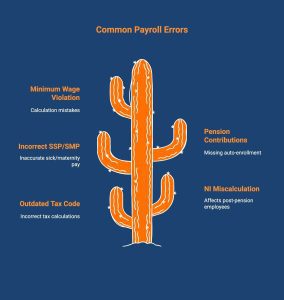
Payroll errors can disrupt more than just pay slips; they can cause employees to miss rent or mortgage payments, lose trust in the company, and your business could face fines or legal trouble from His Majesty’s Revenue and Customs (HMRC).
Here are some common errors to watch out for:
- Using an outdated or incorrect tax code. This can cause employees to overpay or underpay tax, leading to refund delays or unexpected bills.
- Miscalculating National Insurance, especially for employees past pension age. This results in inaccurate deductions and could trigger HMRC corrections or penalties.
- Getting SSP or SMP payments wrong. Employees may receive less statutory pay than they’re entitled to, causing frustration and potential claims.
- Incorrect pension contributions or missing auto-enrolment. This can breach pension regulations and lead to fines or loss of employee trust.
- Paying below the National Minimum Wage due to calculation mistakes. This violates employment law and can result in serious financial penalties for your business.
Fixing payroll errors quickly keeps employee records accurate and your business compliant. Correcting mistakes within the same tax year also prevents future problems with tax codes and National Insurance contributions.
What are Basic PAYE Tools, and How Do They Help in Correcting Payroll Errors UK?
Basic PAYE Tools (BPT) is free software from HMRC designed for small employers to manage payroll, calculate tax and National Insurance, and report payments accurately. It’s particularly useful for correcting payroll errors and keeping your submissions compliant.
When a mistake occurs, BPT communicates directly with HMRC. You can send corrections through a Full Payment Submission (FPS) for current-year updates or an Employer Payment Summary (EPS) for specific adjustments. Best practice is to ensure your payroll data matches HMRC’s records.
The tool is ideal for employers with fewer than 10 employees or for fixing older tax-year data when commercial payroll systems can’t. It also supports Earlier Year Updates (EYU) for tax years before 2020-21.
How Basic PAYE Tools Helps You Fix Payroll Mistakes
With Basic PAYE Tools (BPT), you don’t need to resend old payroll reports when something goes wrong.
Instead, you update your year-to-date (YTD) figures, which are the total pay, tax, and deductions reported so far in the tax year, in your next submission. This keeps HMRC’s records accurate and avoids duplicate entries.
Here’s how each correction type works:
- Full Payment Submission (FPS): This is your regular payroll report sent to HMRC each time you pay employees. If you spot an error in real time during the current tax year, such as incorrect pay, tax, or National Insurance, include the corrected totals in your next FPS.
- Earlier Year Update (EYU): This is a special correction report for tax years before 2020-21. Use it to fix older payroll errors, such as adjusting pay or deduction figures that were entered incorrectly in previous submissions.
- Employer Payment Summary (EPS): This report handles adjustments that don’t involve employee pay. Use it to reclaim statutory payments (like sick or maternity pay) or update figures such as your Apprenticeship Levy or CIS deductions.
If you’re running payroll for fewer than 10 employees and want to stay HMRC-compliant without expensive software, Basic PAYE Tools is a must-have. Download it [here] and avoid common payroll headaches.
What are the Steps for Correcting Payroll Errors in Basic PAYE Tools?
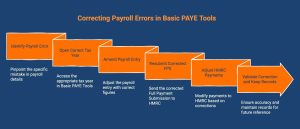
Payroll mistakes happen, even to the most organised employers. Whether it’s a wrong tax code, missed deduction, or incorrect pay, fixing errors quickly keeps you compliant and avoids HMRC issues.
The good news? Basic PAYE Tools (BPT) makes payroll corrections simple when you follow the right steps. The following sections cover the steps you need to take to correct any errors.
Step 1: Identify the Payroll Error Clearly
Start by pinpointing exactly what went wrong.
- Check the affected employee’s pay details, including basic pay, overtime, deductions, and National Insurance (NI).
- Compare the “Pay in this period” and “Year-to-date (YTD)” amounts from your last submission.
- Confirm whether the mistake is in the current tax year or a previous tax year, as the correction process differs slightly.
Tip: Save a copy of the incorrect payslip or FPS submission for reference. It’s much easier to correct errors when you know the original figures.
Step 2: Open the Correct Tax Year in Basic PAYE Tools
Next, open Basic PAYE Tools and go to the right tax year:
- Go to the ‘Employer Details’ section.
- Select the correct tax year you need to edit.
- Click ‘Manage Employees’ and choose the staff member whose record needs correcting.
This ensures your correction applies to the right pay period and avoids duplicate or mismatched records.
Step 3: Amend the Payroll Entry
Once you’ve found the right employee and period:
- Select the relevant payment month and click ‘Change’ or ‘Amend’.
- Enter the correct figures for pay, deductions, and YTD totals.
- Make sure the payment frequency and payment date match the original submission.
Example:
If an employee was paid £2,000 instead of £2,500, adjust the “Pay this period” and revise the YTD total to reflect £2,500.
Step 4: Resubmit a Corrected FPS (Full Payment Submission)
Now that you’ve made your changes, you’ll need to resend the data to HMRC.
An FPS (Full Payment Submission) is the report employers send to HMRC every time they pay employees, showing details like pay, tax, and National Insurance for that period.
Here’s what to do:
- Open the submission screen and choose to send a new FPS.
- In the ‘Late Reporting Reason’ field, select ‘H – Correction to earlier submission’.
- Double-check all details and then submit the corrected FPS through Basic PAYE Tools.
Why this step matters: It updates HMRC’s records to match your payroll, ensuring all deductions and contributions are accurate for both employer and employee.
Step 5: Adjust HMRC Payments if Necessary
If your correction changes how much tax or NI you owe HMRC:
- If you underpaid, include the difference in your next payment.
- If you overpaid, deduct the overpaid amount from your next payment or contact HMRC for a refund.
Always keep detailed calculations showing how the adjustment was made. This helps during reconciliation and audits.
Step 6: Validate Your Correction and Keep Records
Once the correction is submitted:
- Wait for confirmation from HMRC that your updated FPS has been received successfully.
- Save copies of both the original and corrected FPS submissions.
- Keep all correspondence, calculations, and adjustment notes for at least three years.
Why it’s important: Proper documentation protects your business if HMRC requests a payroll audit or review.
What are the Ways of Correcting Payroll Errors Previous Year?
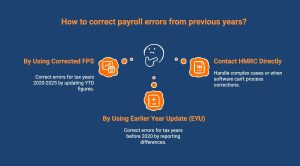
If you discover a payroll mistake from a past tax year, the process depends on which year the error occurred and what tools you’re using. HMRC provides specific guidance to help employers correct past payroll submissions accurately and stay compliant.
For Tax Years 2020 to 2025
You can correct payroll errors using Basic PAYE Tools by submitting a corrected Full Payment Submission (FPS). Update the Year-to-Date (YTD) figures to reflect the right amount of correct totals for that employee. This ensures HMRC’s records align with your revised payroll data.
For Tax Years Before 2020
HMRC requires employers to use an Earlier Year Update (EYU) instead of a new FPS. An EYU reports the difference between the original and correct figures, not the new total. This method is used exclusively for older tax years where real-time reporting wasn’t in full effect.
If your main payroll software doesn’t support EYU submissions, you can use HMRC’s Basic PAYE Tools to create and send one easily. This ensures each employee’s pay and National Insurance contributions are accurate for the relevant year.
When to Contact HMRC Directly
Some complex or exceptional cases require direct communication with HMRC. For example:
- When payroll errors involve serious ill-health lump sums or other non-standard payments.
- If your software can’t process corrections for very old tax years.
- When you’ve overpaid or underpaid National Insurance, that cannot be automatically reconciled.
In such cases, contact HMRC’s Pay As You Earn and Self Assessment team for tailored guidance. Include the employee’s name, National Insurance number, and a clear explanation of the correction.
If in doubt, always seek help before resubmitting data. Direct confirmation from HMRC ensures your records remain compliant and accurate.
What Are HMRC’s Time Limits and Rules for Correcting Payroll Errors?
If you’ve spotted a payroll mistake, don’t worry, HMRC gives you clear steps and deadlines to fix it. You can easily correct current-year errors by updating your year-to-date (YTD) figures in your next Full Payment Submission (FPS).
If you entered the wrong payment date, send a new FPS with the correct date by the 19th of the following tax month.
The method you use to correct payroll depends on which tax year the error relates to:
| Tax Year of Error | How to Correct It |
|---|---|
| Current tax year | Update year-to-date (YTD) figures in your next FPS. |
| 6 April 2020 – 5 April 2025 | Send another FPS with the correct YTD figures. |
| 6 April 2019 – 5 April 2020 | Submit a new FPS or an Earlier Year Update (EYU). |
| Before 6 April 2019 | Use an Earlier Year Update (EYU). |
If you’re correcting a previous year’s error, consider using HMRC’s Basic PAYE Tools, especially if your payroll software doesn’t support EYU. Always keep copies of both the original and corrected reports.
How Can Employers Avoid HMRC Penalties for Payroll Mistakes?
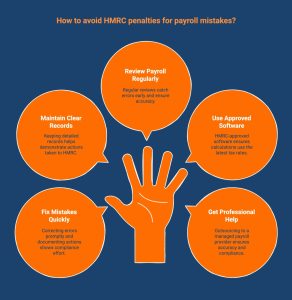
HMRC issues penalties when employers fail to take reasonable care, submit incorrect information, or miss payroll deadlines. These fines can range from £100 for a late submission to thousands of pounds if errors are repeated or deliberate.
For example:
- Submitting an FPS or EPS late can trigger an automatic £100 monthly penalty.
- Consistently paying employees incorrectly or using outdated tax codes can lead to compliance investigations.
- Not enrolling eligible employees in a pension scheme can result in fines starting from £400, increasing daily until resolved.
To stay penalty-free, employers must show they’re acting responsibly and correcting mistakes promptly.
Here’s how to avoid HMRC penalties:
- Fix mistakes immediately and record what was changed, when, and why.
- Keep detailed payroll records that show every adjustment and submission.
- Review payroll regularly to catch errors before they reach HMRC.
- Use HMRC-recognised payroll software to stay aligned with current tax thresholds and rates.
- Seek professional support from managed CIS and payroll providers if payroll becomes too complex to manage in-house.
By correcting errors quickly, maintaining accurate records, and following official payroll deadlines, you’ll demonstrate compliance and avoid unnecessary fines or scrutiny from HMRC.
How Can Direct Payroll Help You Correct Payroll Errors in Basic PAYE Tools?
Payroll mistakes can be stressful, especially when using Basic PAYE Tools. Direct Payroll Services helps you identify and fix payroll errors quickly while keeping everything compliant with HMRC. Our experts handle managed payroll services, salary calculations, deductions, and reporting with precision, so you never have to worry about incorrect data or late submissions. With our outsourced payroll services in London, your business stays accurate, compliant, and stress-free every month.
Let us handle the tricky parts of payroll so you can focus on your business. Contact Direct Payroll today to get your payroll back on track.
Conclusion
In conclusion, correcting payroll errors swiftly is essential for maintaining compliance and ensuring employee satisfaction. By understanding the various types of errors, the importance of timely corrections, and utilising the right features within the PAYE system, you can significantly reduce the likelihood of future mistakes.
Frequently Asked Questions
What should employers do if payroll errors affect employees?
If payroll errors affect employees, inform them quickly, explain what went wrong, and issue a corrected payslip. Fix the records immediately to maintain trust and ensure accurate tax and payment details.
How can employers reduce payroll errors long-term?
To reduce payroll errors long-term, review payroll records regularly, keep employee information current, provide staff training, and use reliable payroll software to minimise human error and ensure consistent accuracy in every pay cycle.
What are the most common payroll error triggers in the UK?
Common payroll error triggers in the UK include incorrect tax codes, wrong National Insurance calculations, errors in statutory pay, inaccurate gross pay entries, and data input mistakes caused by manual record management.
Who should I contact for help if I can’t resolve a payroll error in basic PAYE tools?
If you can’t resolve payroll errors in Basic PAYE Tools, contact HMRC’s employer helpline. They provide step-by-step guidance on correcting issues and ensuring your payroll records remain accurate and compliant.
Can payroll errors in Basic PAYE Tools affect tax or National Insurance contributions, and how do I fix them?
Payroll errors affect tax and National Insurance calculations. To correct them, update year-to-date figures in your next FPS or send an additional FPS or an Earlier Year Update (EYU) for previous years.
What should all users know about correcting payroll errors in Basic PAYE Tools?
All users correcting payroll errors in Basic PAYE Tools should update year-to-date figures and resubmit an FPS promptly. HMRC correcting payroll error guidance ensures compliance and keeps tax and employee data accurate.
How long do employers have to correct payroll errors?
Employers should correct payroll errors as soon as possible. HMRC allows adjustments within the same tax year, ensuring accurate records and avoiding penalties for delays in payroll reporting or tax calculations.